2025 · National bank · 4 months
A national bank was merging six separate online banking products into one. The login screen was the first thing every client would see — and the easiest place to lose them.
One
“Make logging in faster.” That was the ask. What it actually meant: clients were re-authenticating four to six times a day because of strict session timeouts, and they were doing it with login, password, certificate, and a hardware token. The whole ritual took close to a minute when nothing went wrong, and it almost always went wrong somewhere.
The first week I just sat with support tickets. People weren’t complaining about the design. They were complaining about plugins that wouldn’t install, about errors that said “try again” with no hint of what to try, about being asked for their certificate path on every single login as if the system had amnesia.
Two
A login screen that had been patched for eight years. Six different teams had bolted on their own error states. There was no shared error table — front-end and back-end engineers were inventing copy on the spot, in two languages, sometimes mid-PR.
Below: a representative tour. Notice that all five errors look essentially the same, despite being caused by completely different things.
A real screenshot from the live product. The most common error in the system also had the least useful copy.
"Plugin not detected." Detected by what? Installed where? Silence.
Wrong password — but also clears the login field. Twice as much typing as a punishment.
Validation fires on focus, before the user has typed anything. Red before they've done anything wrong.
The path to install the missing plugin is hidden three clicks deep, inside the error itself.
"Please refresh the page." The number-one piece of advice from a system that should know what is wrong.
I made a spreadsheet. By the end of week two it had 41 rows. Every row was a state the user could land in, indexed by what triggered it (front-end, back-end, browser, hardware), what the user saw, and what — if anything — they could actually do about it. This spreadsheet ended up being the most valuable artifact of the whole project.
Three
The design changes were small. The behavioural changes were not. Three things mattered:
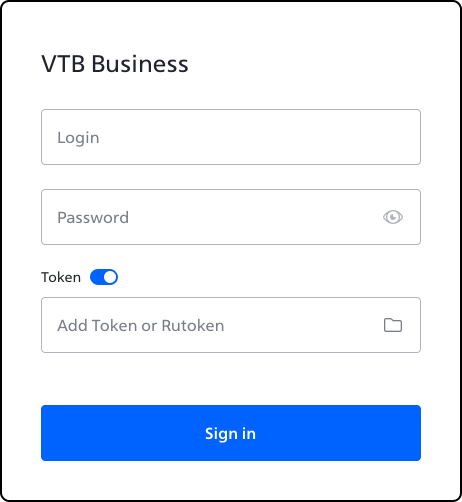
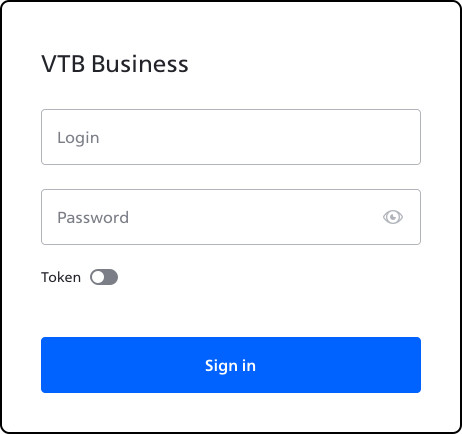
Empty state. Two fields, one toggle for 'use certificate'. Everything else hidden until needed.
Toggle on, certificate path appears, pre-filled from last session. The user confirms; they don't re-type.
Credentials in, token auto-resolved. The "Sign in" button activates the moment all conditions are met — no separate "check token" step.
Four
A/B against the legacy flow ran for six weeks. Average login time dropped 57%. Support tickets tagged “can’t log in” dropped roughly in half over the following quarter — a fuzzier number, because tagging itself changed mid-rollout, but the direction was clear.
The thing I’m proudest of isn’t the screens. It’s the error table. It outlived the project. The teams now use it as a contract: any new error has to be added to the table, with copy, recovery action, and an owner, before the PR is merged.
57%
Faster median login on the new flow vs. legacy.
6M
Business clients eventually moved onto the unified flow.
41
Edge cases mapped, copy-checked, and assigned an owner.